Floral Crown Tiger: Integrating Vector Assets into Creative and Production Workflows
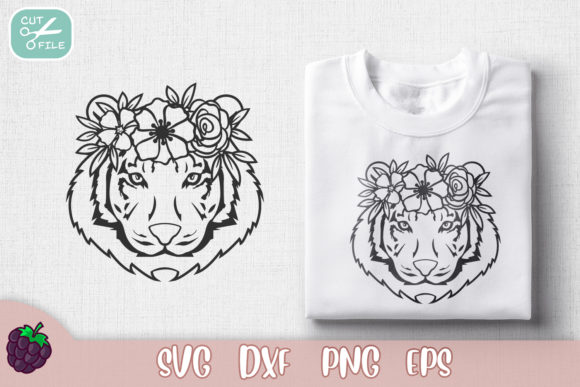
The Floral Crown Tiger design serves as a versatile digital asset for creators, small business owners, and hobbyists who require high-quality vector graphics for physical production. Unlike raster images that lose quality when resized, this design is engineered specifically for scalability and precision across various manufacturing platforms. Whether you are producing custom apparel, designing event signage, or creating personalized home decor, understanding the technical specifications and workflow integration of this file set is essential for achieving professional results. The asset package includes EPS, SVG, PNG at 300 PPI, and DXF formats, ensuring compatibility with industry-standard design software and consumer-grade cutting machines alike.
Technical Specifications and Format Utility
Before integrating the Floral Crown Tiger into any project, it is necessary to understand the distinct role each file format plays in the production pipeline. This instant download is not a single-purpose image but a multi-format toolkit designed to bridge the gap between digital design and physical output.
- SVG (Scalable Vector Graphics): This is the primary format for users of Cricut Design Space, Silhouette Studio (Designer Edition), and other browser-based or proprietary cutting software. SVG files retain path data, allowing the machine to recognize cut lines versus score lines. Because they are XML-based, they remain crisp at any dimension, making them ideal for resizing designs from sticker size to wall decal scale without pixelation.
- DXF (Drawing Exchange Format): Specifically optimized for the basic version of Silhouette Studio and certain laser cutting software. DXF is a universal CAD data file format that facilitates interoperability between different vector editing programs. If your software does not support SVG imports natively, DXF serves as the reliable fallback for maintaining editable vector paths.
- EPS (Encapsulated PostScript): The industry standard for professional graphic designers using Adobe Illustrator, CorelDRAW, or Affinity Designer. EPS files preserve complex layering, color profiles, and typography outlines. This format is crucial if you intend to modify the Floral Crown Tiger design extensively, change color palettes to match brand guidelines, or combine it with other vector elements in a composite layout.
- PNG (300 PPI): A high-resolution raster image included for applications where vector editing is unnecessary or unsupported. At 300 pixels per inch, this file meets print-industry standards for direct-to-garment (DTG) printing, sublimation transfers, and digital mockups. It provides a transparent background, allowing for easy placement over colored textures or product photography without manual masking.
Pre-Production Planning and Software Compatibility
Successful implementation begins before the file is even opened. A common bottleneck in creative workflows is discovering incompatibility after purchasing an asset. For the Floral Crown Tiger, verification is a critical first step. Users must confirm that their specific software version supports the intended file type. For example, while newer versions of most cutting software handle SVGs seamlessly, legacy versions may require DXF conversion. Checking system requirements prevents workflow interruptions and ensures the instant download functions as expected immediately upon acquisition.
Organization is equally important in the preparation phase. Digital assets should be stored in a structured directory system rather than left in a generic downloads folder. Creating a dedicated library for vector art, categorized by theme or project type, streamlines future retrieval. When working with the Floral Crown Tiger, consider renaming files to include metadata such as dimensions or intended use case (e.g., "FloralCrownTiger_SVG_4x4_Inch") to avoid confusion during batch processing or when managing multiple variations of the same design.
Execution Strategies for Cutting Machines and Print
During the active creation phase, the Floral Crown Tiger interacts directly with hardware settings and material constraints. For vinyl and heat transfer projects, the vector nature of the SVG and DXF files allows for precise weeding. Complex floral details require appropriate blade depth and pressure settings; because this design features intricate organic lines, users should perform test cuts on scrap material to calibrate their machines. The clean paths inherent in professionally digitized vectors reduce the likelihood of jagged edges or disconnected nodes, which are common issues with auto-traced images.
For print-based workflows utilizing the 300 PPI PNG, color management becomes the primary focus. Screen colors often differ from printed output due to RGB versus CMYK color space discrepancies. If using the PNG for sublimation or DTG, verify that your printer profile matches the substrate. While the PNG is high resolution, it is static; unlike the vector formats, it cannot be resized upward without quality loss. Therefore, determine the maximum print area required before placing the asset in your layout software. If the project demands dimensions larger than the native PNG size, revert to the EPS or SVG source file to generate a new raster export at the correct scale.
Post-Processing and Commercial Application
After the physical product is created, the Floral Crown Tiger asset continues to provide value through documentation and marketing. High-quality mockups are essential for e-commerce listings and portfolio presentations. The transparent PNG format can be layered over product blanks in Photoshop or Canva to create realistic previews without photographing every individual item. This efficiency is vital for entrepreneurs managing large inventories or print-on-demand businesses where speed to market dictates revenue.
For educators and workshop leaders, this design serves as an excellent teaching tool for demonstrating layer hierarchy, grouping, and welding functions in vector software. The complexity of the floral crown offers enough detail to challenge intermediate students while remaining accessible to beginners. By using a consistent asset like Floral Crown Tiger across a curriculum, instructors can isolate variables and focus on technique rather than troubleshooting file corruption or poor digitization.
Quality Control and Long-Term Asset Management
Maintaining consistency across multiple projects requires rigorous quality control. When using the Floral Crown Tiger in a series—such as matching wedding stationery, signage, and favors—ensure that all outputs derive from the same master file version. Mixing formats inadvertently (e.g., using a PNG for one item and an SVG for another) can result in slight visual discrepancies in line weight or detail. Standardizing on the vector source for all scalable applications guarantees uniformity.
Long-term usability depends on proper archiving. As software updates and hardware evolve, file standards shift. Keeping the original ZIP archive of the Floral Crown Tiger ensures access to unaltered source files. Avoid saving over original masters; instead, use "Save As" to create working copies for specific modifications. This practice preserves the integrity of the initial purchase and allows for future adaptation as new tools or techniques emerge. Additionally, backing up digital libraries to cloud storage or external drives protects against data loss, ensuring that valuable assets remain available for repeat clients or seasonal restocks.
Integrating Digital Assets into Business Efficiency
For professionals and freelancers, time is a tangible cost. The inclusion of four distinct formats in the Floral Crown Tiger package eliminates the need for manual file conversion, which can introduce errors and consume billable hours. Auto-tracing a raster image to create a cut file often results in imperfect nodes and excessive anchor points that slow down cutting machines and degrade finish quality. By starting with pre-digitized vectors, creators bypass this technical debt entirely.
Furthermore, the versatility of this asset supports diversified revenue streams. A single design can be repurposed across physical products, digital downloads, and branding materials. This maximizes return on investment and reduces the cognitive load associated with sourcing new artwork for every initiative. When integrated thoughtfully into a broader content or production strategy, the Floral Crown Tiger transitions from a simple graphic to a foundational component of an efficient, scalable creative operation.
Ultimately, the effectiveness of any digital asset lies in how well it aligns with the user's existing ecosystem. By respecting file specifications, organizing resources logically, and applying appropriate technical settings, users can leverage the Floral Crown Tiger to enhance both the quality of their output and the efficiency of their workflow. Whether for personal expression or commercial enterprise, the intersection of artistic design and technical precision is where sustainable creativity thrives.